Find your flow.
Navigate your project, edit files and keep your next ideas beside the code they belong to.
 Petacore
YOUR LINUX SOFTWARE WORKSHOP
Write it. Test it. Sign it. Ship it.
One native workspace for the work around your code.
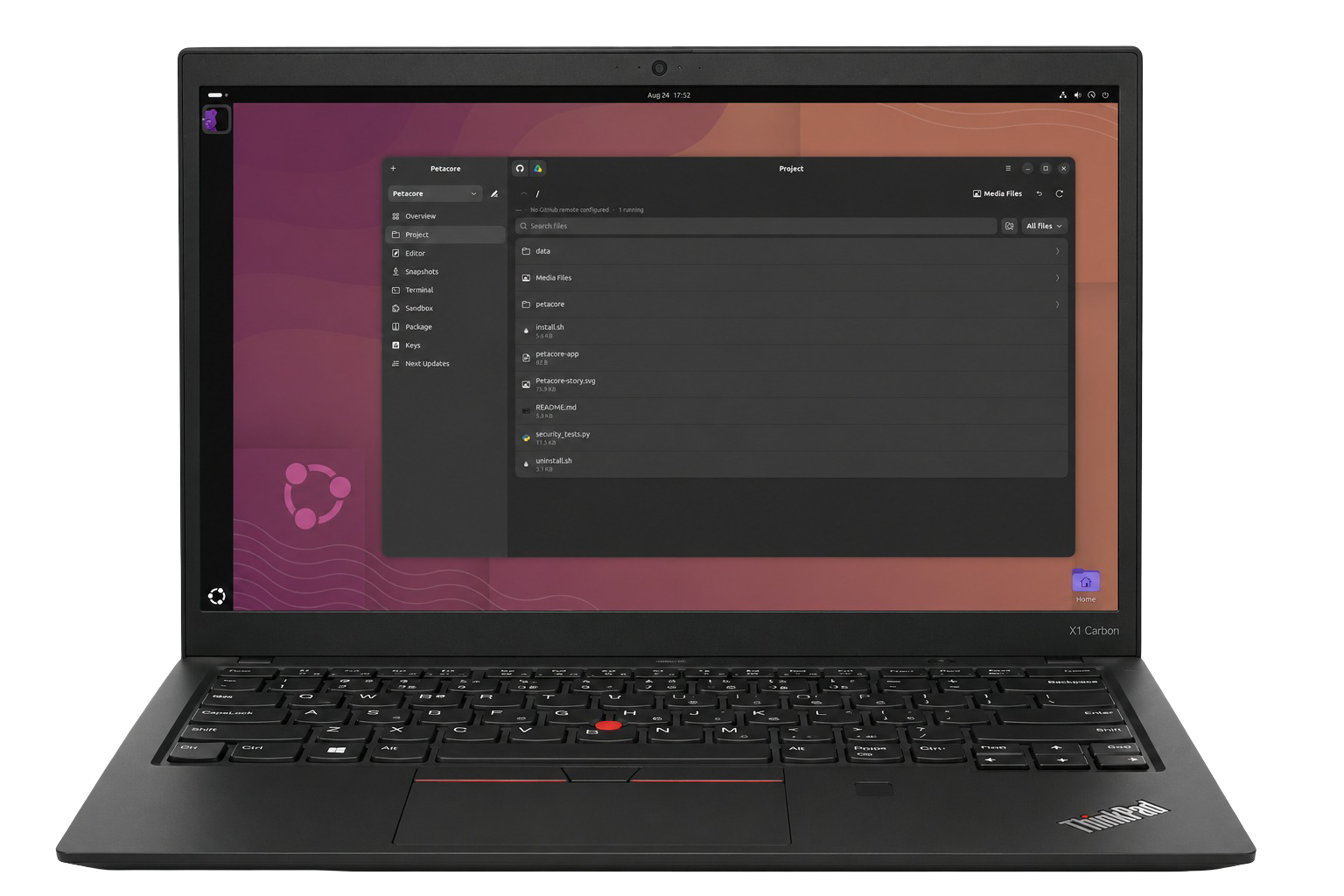
A familiar home for your files, your tools and everything you’re building.
LESS SETUP. MORE MAKING.
The code is only part of the project. There are files to organise, changes to test, packages to build and keys to manage. Petacore brings that everyday work into one window, so the next step is easier to find.
Navigate your project, edit files and keep your next ideas beside the code they belong to.
Keep snapshots of your work and try changes in a separate sandbox session.
Build packages, add metadata, sign your release and prepare an APT repository.
01 — YOUR WORKSPACE
Your project stays an ordinary folder. Your history stays in Git. Your work stays yours.
Petacore gives familiar files a more comfortable home, without turning your project into a proprietary format. Its own project data lives in a hidden .petacore/ folder.
02 — WRITE & REFINE
A lightweight editor for the changes you want to make right now.
Open files in tabs, read with syntax highlighting and define named line sections. Select a section to dim the rest and concentrate on the part that matters.
When you save, Petacore can offer to copy the file into your installed application’s folder, bringing a change closer to a real test.
Petacore’s editor handles everyday work. Your project is still a normal folder, ready to open in the editor or development tools you already use.

03 — MAKE ROOM TO EXPERIMENT
A good workflow leaves room for a change of mind. Petacore combines project snapshots with isolated test sessions to make everyday experimentation more manageable.
Save compressed copies of your project manually or on a timer. Snapshots complement Git by keeping the working state, including changes you have not committed.
Before restoring an older snapshot, Petacore takes a snapshot of the current state. Going back does not have to mean losing where you were.
Run a project copy in a bubblewrap sandbox with a read-only root, a masked home directory and isolated process, IPC and hostname namespaces.
Networking starts disabled. If a detected network error indicates access is needed, Petacore asks before allowing it for that session. The session is removed when you close it.
Designed to reduce accidental damage during development. The sandbox is not a boundary for hostile code; use a virtual machine for that. Network failure detection depends on errors the application prints.
04 — STAY CONNECTED
Keep your working project on your machine, with options to sync it beyond your desktop.
Sync your project with GitHub and use an existing GitHub CLI login. Tokens use the desktop keyring where available; Petacore shows the storage mode if it needs an owner-only file fallback.
Sync through rclone. Removed cloud files move into dated folders, and an upload smaller than the existing cloud copy asks for confirmation.
Encrypt names and file contents in cloud storage while keeping ordinary source files locally. Private signing keys stay out of cloud uploads.
05 — PACKAGE & SIGN
Move beyond a folder of source code. Bring packaging, application metadata and signing into the same workflow as the rest of your project.
Build with the established tools underneath: dpkg-deb for Debian packages and rpmbuild for RPM output.
Add AppStream metadata, including a publisher, SPDX licence, summary and homepage, to describe what you are shipping.
Generate and manage GPG keys, inspect full fingerprints and embed a signature in the package. Signing is enabled by default.
If your selected signing key is missing, packaging stops rather than silently choosing another one. Credential files are excluded from packages, and those exclusions are reported.
Take the next step from a single package to a place to publish your releases.
Petacore brings APT repository checking and control into your workflow, alongside tools for assembling a repository from your package pool.
Prepare a repository around your packages.
Produce signed indexes and a public verification key.
Publish the resulting static files on the hosting you choose.
Keep APT repository work alongside your project and release tools.
Repository trust and an embedded package signature are separate. Installing a standalone package may still show a third-party software notice.
07 — SEE WHAT’S NEXT
Use Next Updates for titles, notes, priorities and attachments. Your plans travel and sync with the project they belong to.
See file, line and character counts, language shares and an inferred target operating system. Export project statistics as a shareable image.
The operating system estimate is inferred from project files and content.
NATIVE BY DESIGN
Built with Python, GTK 4 and libadwaita. Made for GNOME.
Petacore brings established Linux tools together behind a native interface. Work runs on background threads to keep the interface responsive. When an optional tool is missing, its feature explains what is needed rather than stopping the whole application.
Available in five interface languages. Open source under GNU GPLv3.
GET PETACORE
This package is a beta release. Installation and application startup have not been tested.
Use either the direct download or the repository method. Commands run in your terminal; sudo asks for your computer password. Download commands require wget; repository setup requires curl.
wget "https://get.kotechsoft.com/pool/main/p/petacore/petacore_1.0~beta2_all.deb"wget -O "petacore_1.0~beta2_all.deb" "https://get.kotechsoft.com/pool/main/p/petacore/petacore_1.0~beta2_all.deb" && sudo apt update && sudo apt install "./petacore_1.0~beta2_all.deb"cd ~/Downloads && sudo apt update && sudo apt install "./petacore_1.0~beta2_all.deb"The third command assumes your browser saved the file in ~/Downloads. If you chose another folder, change that path.
Add the repository once to receive future package updates through APT. This uses the repository key, which is separate from the Petacomm package-signing key.
(repo_tmp=$(mktemp -d) && trap 'rm -rf "$repo_tmp"' EXIT && curl -fsSL https://get.kotechsoft.com/kotech-archive-keyring.gpg -o "$repo_tmp/key.gpg" && curl -fsSL https://get.kotechsoft.com/kotech.sources -o "$repo_tmp/kotech.sources" && sudo install -d -m 0755 /etc/apt/keyrings && sudo install -m 0644 "$repo_tmp/key.gpg" /etc/apt/keyrings/kotech-archive-keyring.gpg && sudo install -m 0644 "$repo_tmp/kotech.sources" /etc/apt/sources.list.d/kotech.sources && sudo apt update && sudo apt install petacore)sudo apt update && sudo apt install petacoresudo apt update && sudo apt install --only-upgrade petacoresudo apt remove petacoreGET STARTED
Install Petacore from the source repository and open your Linux software workshop.
Installation guide ↗git clone https://github.com/petacomm/petacore.git
cd petacore
./install.shRun the installer as your regular user. It requests administrator access only for dependencies and refuses to run as root. The installer uses APT; producing RPM packages does not imply installation support on RPM-based distributions.
A FEW THINGS TO KNOW
Individual developers and small studios making software for Linux. It assumes familiarity with files and software projects, without requiring command-line fluency for the everyday interface.
Petacore includes a lightweight editor and works with Git. It brings project and release tasks together while leaving your files available to other tools. It is not intended to be a full IDE.
No. The documented release is a desktop workspace, without a shared server, team access controls or a code-review workflow.
The documented release does not update itself automatically. Use the installation flow to upgrade. To remove it, run ./uninstall.sh from the source directory; the uninstaller asks separately about the application, settings and snapshots.
Yes. Petacore is distributed under GNU GPLv3. Its licence does not automatically apply to the packages you create with it.
Open an issue in the Petacore GitHub repository with your system, version and reproduction steps. Send sensitive security reports privately to [email protected].
PETACORE BY PETACOMM
Bring your next Linux project to life.